Sales Order
What is a Sales Order?
A sales order is your company's internal document that records a customer's purchase request and authorizes fulfillment, inventory allocation, and invoicing. When a customer sends you a purchase order, you create a corresponding sales order in your ERP system—same transaction, different perspective. For a complete breakdown of how purchase orders and sales orders differ—and why the translation breaks everything—see our full comparison.
That translation sounds simple. Customer wants 100 blue widgets, you create a sales order for 100 blue widgets, warehouse ships them. Done.
In practice? The gap between "customer sends PO" and "sales order exists in your ERP" is where companies bleed time, money, and customer goodwill. Their part numbers don't match yours. Their pricing doesn't match your current list. Their "Chicago warehouse" could be any of six locations in your Microsoft Dynamics or SAP system.
That translation—from their document to yours—is rarely as simple as it sounds.
Why Does the PO-to-Sales-Order Translation Break Everything?
Your customer's purchase order and your sales order should contain the same information. They almost never do.
Your customer's PO says "Blue Widget Standard, Part # BWS-100, Ship to Chicago warehouse." Your Oracle NetSuite has that product listed as "Widget Assembly, Blue, 12-inch, SKU WDG-100-BLU." And you have six Chicago locations on file. Which one?
This isn't an edge case. This is every order, every day.
The translation challenges stack up fast:
Part numbers never match. Your customer built their purchasing system before they became your customer. They use their internal part numbers—maybe tied to their own SAP MM module or their Sage inventory system. You use yours. Someone has to connect the dots, and that someone is usually your order entry team, manually looking up every line item.
Pricing expectations collide. Their PO says $12.50 per unit. Your price list says $13.00. Is their pricing outdated? Did sales promise a discount that nobody recorded in Epicor? Now you're making phone calls instead of processing orders.
Addresses need interpretation. "Rush to the DC" could mean three different distribution centers depending on which customer sent it. Your ERP needs a validated ship-to code, not a nickname someone typed into an email.
Dates require translation. They want delivery by Friday. Your system needs a ship date that accounts for transit time. If nobody does that math correctly, you're either shipping early (tying up inventory) or late (angry customer).
Here's the thing: your customers aren't being difficult. They're sending orders the way their systems work. The translation problem lands entirely on you.
What Does a Sales Order Actually Contain?
Every sales order has the same basic components—and every component is an opportunity for something to go wrong.
Header information includes the customer account, their PO number for reference, order date, requested delivery date, and payment terms. Miss the PO number, and your customer's AP team won't be able to match your invoice. Get the customer account wrong, and you've just created a billing nightmare that accounting will spend hours untangling.
Line items are where complexity explodes. Each line needs a valid SKU from your catalog, quantity, unit of measure, and pricing. For a 30-line order, that's 120+ data points that all have to be correct. When you're manually entering into Epicor Prophet 21, Microsoft Dynamics 365, or Infor CloudSuite, you're touching 15-20 fields per order minimum. And if you've ever had your ERP time out mid-entry and lost the whole order, you know that particular frustration.
Shipping details cover the ship-to address, carrier preferences, and any special handling instructions. "Liftgate required" buried in the notes means a redelivery fee if someone misses it.
Payment and credit information determines whether this order can even ship. Credit holds catch orders after entry—which means you've already done the work before discovering the customer is over limit.
And that's a clean order. Add in customer-specific requirements, blanket order releases, partial shipments, and special packaging instructions, and you've got a document that can take significant time to enter correctly.
Why Does Manual Sales Order Creation Cost More Than You Think?
The obvious cost is labor. Based on industry experience, order entry teams typically spend 8-15 minutes per order depending on complexity and system. At 100 orders a day, that's 15-25 hours of pure data entry. You could calculate the hourly cost and stop there.
But that's not where the money actually goes.
Error correction eats margin. A wrong SKU means wrong product ships. Now you're paying return shipping, restocking, and rush delivery on the correct item. Industry research on reverse logistics suggests return processing costs can range from 20% to over 50% of the original product value when you factor in shipping, handling, restocking, and customer service time—often exceeding the profit margin on the original order.
Pricing mismatches erode trust. If your sales order doesn't match their PO pricing, you've got a choice: eat the difference or have an awkward conversation. Neither option is good. And if this happens repeatedly, you're training your customer to double-check everything you send—which slows down their payments.
Duplicate orders create chaos. Customer emails a PO, doesn't get confirmation fast enough, calls to place it again. If your team doesn't catch the duplicate, you ship twice. Customer returns one, you've wasted fulfillment costs, and someone's got to sort out the paperwork.
Slow entry creates service problems. Orders sitting in the entry queue aren't in the fulfillment queue. Your warehouse shows nothing to pick while your customer wonders why their "rush" order hasn't shipped. The bottleneck isn't shipping. It's the inbox.
Your customer service team isn't slow. The process is broken.
How Does Automation Eliminate the Translation Layer?
Here's where order automation changes everything.
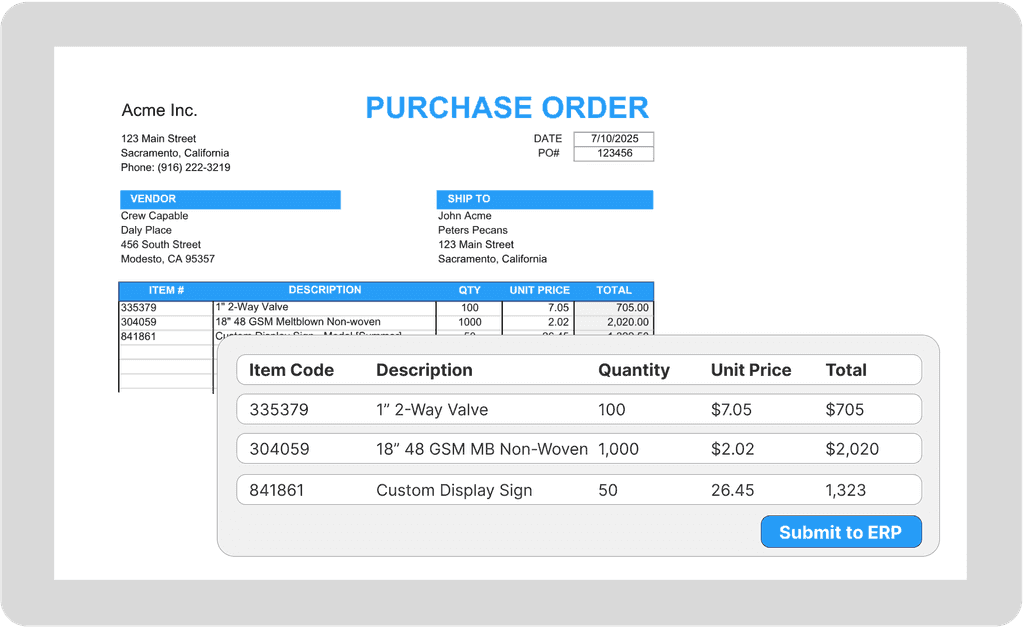
Instead of your team manually interpreting each purchase order and typing data into your ERP, automation handles the translation in minutes:
Any format accepted. Email attachments, PDFs, Excel files, email body text, even scanned documents. The customer sends orders however they want. The automation adapts—no templates to maintain, no format requirements to enforce.
Automatic customer matching. The system recognizes who sent the order and pulls the right account, pricing, and ship-to defaults from your ERP. No lookup required. Whether you're running SAP S/4HANA, Oracle NetSuite, Acumatica, or QuickBooks Enterprise, the customer data syncs automatically.
Part number translation. Customer's "BWS-100" automatically maps to your "WDG-100-BLU." AI-based systems like Crew Capable learn these patterns—they don't just match exact codes, they understand that "blue widget standard" means the same thing. The system builds cross-reference intelligence from your actual orders.
Validation before entry. Pricing checked against your master data. Ship-to addresses validated. MOQs enforced. Problems get flagged before they become shipped errors.
Exception routing. When something doesn't match—unknown part number, pricing discrepancy, credit hold—the order queues for human review with context. Your team makes decisions, not keystrokes.
The shift isn't just faster order entry. It's moving your team from data entry to exception handling. They're reviewing the orders that actually need attention, not typing the same SKUs they typed yesterday.
Stop manually translating customer POs into sales orders. See how Crew Capable turns any order format—email, PDF, Excel, even handwritten notes—into validated, ERP-ready sales orders automatically.