Sales Order Processing
What is Sales Order Processing?
Sales order processing is the complete workflow that transforms a customer's purchase order into validated data in your ERP system—from initial receipt through data entry, validation, credit check, inventory allocation, and approval for fulfillment. It's not one step; it's a sequence of handoffs that all have to go right.
Monday morning. 47 new emails. Somewhere in there are 30 purchase orders from customers who all expect confirmation by noon. Your team has four hours to enter them all, validate pricing, check inventory, and get orders into the ERP before the warehouse hits cutoff.
That's sales order processing in the real world. Not the neat workflow diagram in your process documentation—the actual scramble to turn customer requests into shipments without breaking anything along the way.
And here's what nobody tells you: most companies have optimized individual steps while completely ignoring the chaos between them. Your ERP is fast. Your warehouse is efficient. The mess is in the middle—and that's where orders die.
What Does the Sales Order Processing Workflow Actually Look Like?
On paper, it's clean: Order received → Data entered into ERP → Credit check → Inventory allocated → Picking → Shipping → Invoice
In reality, it looks more like this:
Order received—except it's in six different formats from six different channels. Email attachments in Outlook, a customer portal you have to log into manually, EDI transactions from SPS Commerce or TrueCommerce in a separate mailbox, and that one customer who still faxes. Your team checks five different places every morning before they can even start entering orders.
Partially entered into Microsoft Dynamics, then interrupted by a phone call. Now where were you? Line 12 or line 13?
Customer calls to add a line item to the order you just entered. Do you modify the existing sales order or re-enter the whole thing?
Credit check fails in SAP. Sales gets involved. Three email chains later, someone approves an override. The order sat for six hours waiting on a decision.
Inventory shows available in Oracle NetSuite, but it's already promised to that distributor in Texas—someone just hasn't allocated it yet. Your customer gets a backorder notification for product that was supposedly in stock.
Finally ships two days later than promised.
If you've ever seen an order sit in "pending" status for three days because nobody knew it was waiting on credit approval, you know exactly what I mean.
Where Does Sales Order Processing Break Down?
The Order Entry Bottleneck
Still the biggest time sink in most operations. And it's not because your team is slow—it's because the incoming order formats are chaos.
Your team has to check Outlook, two customer portals, the EDI mailbox (whether that's SPS Commerce, TrueCommerce, or Cleo), AND that one customer who still faxes. Every. Single. Morning.
Each channel requires different handling. Email orders need full data entry. Portal orders need export and reformatting before you can bring them into Epicor or Sage. EDI orders need exception review when mapping breaks. Fax orders need someone to decipher handwriting.
Industry benchmarking suggests that manual order entry often consumes a significant portion of customer service team capacity—sometimes 15-25% or more in distribution environments. For companies processing hundreds of orders daily, that often translates to multiple full-time employees doing nothing but typing.
The Validation Gap
Orders that should have been flagged get through. Orders that were fine get stuck. There's no consistency.
Pricing mismatches nobody catches until invoicing—and now you're either eating the margin or having an uncomfortable conversation with your customer three weeks after shipment.
Ship-to addresses that don't exist in the system. Someone typed "123 Main" when the validated address in Infor is "123 Main Street, Suite 200." Carrier kicks it back. Now you're scrambling.
Product substitutions that weren't communicated. Customer ordered a discontinued SKU. Your team entered the replacement without confirming. Customer expected the original.
These aren't rare exceptions. This is Tuesday.
The Exception Handling Black Hole
What happens when something's wrong? Usually: email chains, phone calls, waiting for someone to make a decision. Meanwhile, the order sits.
The order isn't late because shipping is slow. It's late because it sat in someone's inbox for four hours waiting for a pricing decision nobody knew was needed.
Your best order entry person knows to call Mike in sales for that one customer's pricing exceptions. What happens when she's on vacation? The orders pile up because the tribal knowledge walked out the door.
Exception handling depends on institutional memory that's never documented and always at risk.
How Does Modern Automation Transform Sales Order Processing?
Here's what changes when you automate the front end of order processing:
Unified inbox. Orders from email, EDI (SPS Commerce, TrueCommerce, OpenText), customer portals, even fax—all land in one place. No more checking five systems every morning. No more missed orders hiding in a portal you forgot to check.
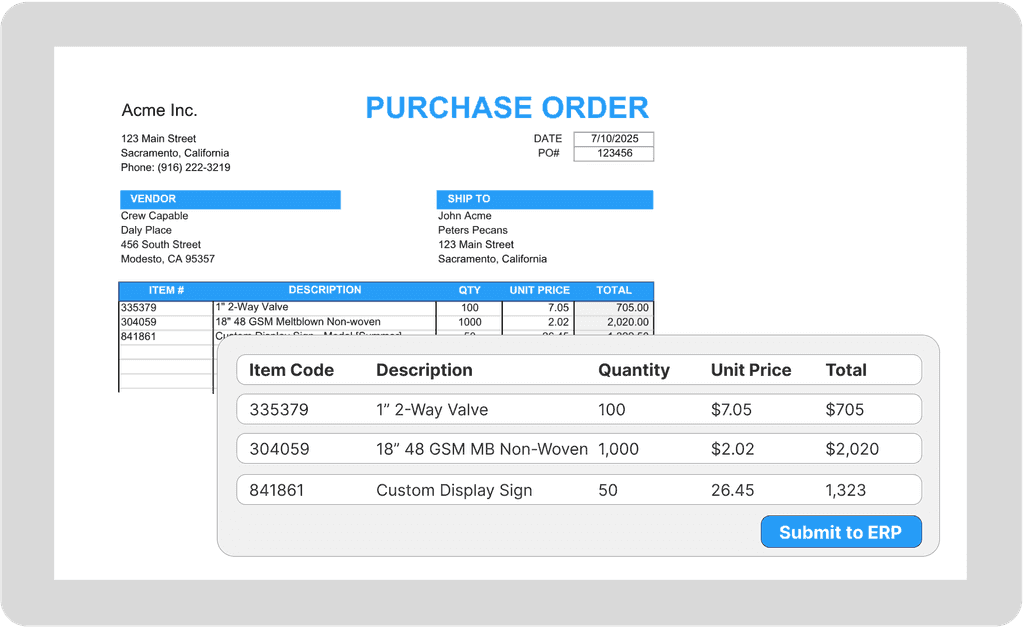
AI extraction. The system reads the order—any format—and pulls the data automatically. Customer name, PO number, line items, quantities, pricing, ship-to address. No typing. Whether it's a clean PDF or a scanned document with handwriting, the AI handles extraction.
Validation before entry. Every order gets checked against your master data before it touches your ERP. Part numbers verified against your catalog. Pricing confirmed against customer-specific price lists. Addresses validated. Problems get flagged before they become shipped mistakes.
Clean orders flow straight through. The majority of straightforward orders—often 70% or more depending on your customer mix and data quality—can flow directly into your ERP with minimal human intervention. Your team never touches them unless they want to review.
Exceptions queue for human review. The orders with problems get routed to your team—with context. "Pricing mismatch: customer PO shows $12.50, price list shows $13.00. Customer: ABC Distributors. Approve, adjust, or contact customer?" Your team makes the decision. The system handles the data entry.
Platforms like Crew Capable don't just speed up order entry—they eliminate the scramble. Orders are validated before your team sees them, so they're making decisions on exceptions, not typing SKUs.
The shift isn't "enter everything, fix mistakes later." It's "review exceptions, confirm clean orders."
What Actually Changes When You Automate?
Order entry time drops dramatically. What typically takes 8-15 minutes per order manually becomes under two minutes with automation. And that two minutes is mostly human review on flagged items—not data entry.
Error rates improve at the source. Instead of catching errors after fulfillment (when they're expensive to fix), validation catches them before ERP entry. Wrong part numbers, pricing mismatches, invalid addresses—all flagged before they become shipped mistakes.
Cutoff stress disappears. Orders process as they arrive throughout the day, not in a morning batch. The 2pm warehouse cutoff stops being a daily crisis.
Your team's role transforms. Your best order entry person isn't typing faster. They're handling the complex orders that actually need human judgment—pricing negotiations, special customer requests, problem resolution. The work that creates value, not the work that just moves data.
The question isn't whether you can afford to automate. It's whether you can afford to keep processing orders the way you do now—with labor costs rising and order volumes only growing.
Stop drowning in order entry. See how Crew Capable automates sales order processing from any format—email, EDI, portals, even faxes—and delivers validated data ready for your ERP.