ERP Integration
What is ERP Integration?
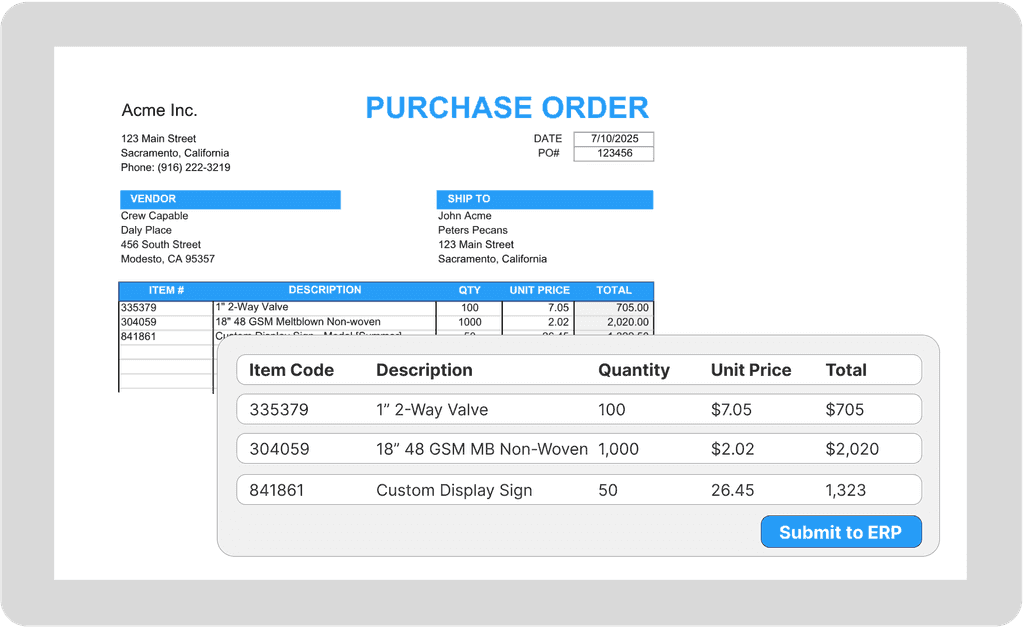
ERP integration connects your order automation system to your ERP - SAP, NetSuite, Epicor, Microsoft Dynamics, Sage, or whatever system runs your operations. It's the difference between copying data from one screen to another and having validated orders flow directly into your system ready for fulfillment.
Sounds simple. In practice? It's usually the thing that stretches a two-week implementation into a three-month IT project. Ask anyone who's been through an integration with their manufacturing ERP and they'll have stories.
Why ERP Integration Gets Complicated
Your ERP isn't just a database. It's a collection of business rules, validation logic, custom fields, and years of configuration decisions that seemed reasonable at the time but now require careful navigation. Connecting anything to it means understanding all of that accumulated complexity.
Here's what a typical integration conversation sounds like:
"We need to send orders to NetSuite."
"Which fields? Standard order header plus lines?"
"Yeah, and customer PO number goes in the memo field - we set it up that way in 2019. Oh, and we have a custom field for freight terms that accounting added. And pricing comes from the contract module, not the order. And ship-to addresses need to match the customer record exactly or it throws a validation error. And..."
Every ERP is different. Every implementation of the same ERP is different. Your NetSuite instance has customizations your competitor's doesn't. That Epicor Prophet 21 implementation uses different field mappings than the Epicor Kinetic system your other division runs. The SAP instance you inherited from an acquisition has configuration that nobody fully documented.
The Integration Approaches Nobody Tells You About Upfront
The "We'll Build a Custom Integration" Path
Some automation vendors will build a direct API connection to your ERP. Sounds great during the sales process - "fully integrated solution" has a nice ring to it. Until you realize:
Custom development takes real time. Six weeks to scope and document requirements. Eight weeks to build and configure. Four more weeks to test in your sandbox environment, fix the issues that surface, and test again. That "quick integration" becomes a quarter-long project before you process a single automated order.
Changes require development work. Need to add a new custom field? That's a change request. New validation rule your finance team wants? Another change request. You're locked into the vendor's development queue for anything beyond the original scope.
Your ERP upgrades break things. NetSuite releases updates every six months. Epicor version upgrades change API endpoints and data structures. SAP S/4HANA migrations require rethinking integrations entirely. Every significant change on the ERP side risks breaking your automation integration.
One manufacturing company spent six months building what they were promised would be a "comprehensive" integration with their SAP instance. They got it working, celebrated the go-live, and processed automated orders for three months. Then SAP released a quarterly update that changed how certain API calls handled date formats. Their automation vendor needed three weeks to diagnose the issue and patch the integration. Two more weeks of testing in sandbox. Orders went back to manual entry for over five weeks while they sorted it out.
That's not a horror story - it's a normal integration lifecycle. The question is whether you're prepared for it.
The "Just Export to CSV" Path
The opposite extreme: skip the custom integration entirely and export orders to CSV files that someone imports into the ERP manually.
This works faster than most people expect. No custom development. No API connections to maintain. No breaking when the ERP updates. Order automation processes the order, validates the data, exports a clean CSV in whatever format your ERP expects, and your team imports it.
Is it elegant? No. Does it work while you figure out the longer-term integration approach? Absolutely. Does it let you start processing real orders on day one instead of waiting months for development? Yes.
The best automation platforms offer both options - start with CSV export today, build the API integration over time. Crew Capable takes this phased approach specifically because most companies need orders flowing before they can commit to a full integration project. Get value immediately, add sophistication when you're ready.
The "Middle Ground" Path
iPaaS platforms like Workato, Celigo, Make, or Tray.io sit between your automation system and your ERP. They handle the translation and connection logic, often with pre-built connectors for common ERPs that reduce custom development.
This approach works well when:
Your IT team already uses one of these platforms for other integrations
You need to connect multiple systems beyond just order automation
You want to own and control the integration logic rather than depending on your automation vendor
You have internal resources who can maintain the workflows
The trade-off: now you're maintaining three systems instead of two. Your automation platform, your iPaaS layer, and your ERP all need to stay in sync. When something breaks, you're troubleshooting across multiple platforms. When you need changes, you're coordinating between vendors.
For companies with mature IT operations, this is often the right choice. For companies trying to move fast with limited technical resources, it adds complexity.
What Actually Needs to Flow Between Systems
When people say "ERP integration," they usually mean order data going into the ERP. But real integration is bidirectional - and that second direction matters more than most implementation plans account for.
Data flowing INTO the ERP:
Order header information (customer, PO number, order date, requested ship date)
Line items with your SKUs (products, quantities, units of measure)
Validated pricing (matching contracts or flagged for review)
Shipping and delivery instructions
Special handling notes and custom field data
Data flowing OUT OF the ERP:
Product catalog (what can actually be ordered, what's active vs. discontinued)
Current pricing and contract terms (what things should cost for each customer)
Customer master data (who's allowed to order, credit status, ship-to addresses on file)
Inventory availability (what's in stock, what's backordered, what's available to promise)
That second direction - ERP data feeding back to automation - matters more than most people realize during planning. Automated order processing needs to validate incoming orders against your current reality. Is this SKU still active? Is this the right price for this customer's contract? Is their credit hold going to block the order anyway?
Without that feedback loop from your ERP, you're just moving data entry from humans to software. The automation types faster, but it's still sending bad data that fails downstream. With bidirectional integration, you're actually validating orders against your business rules before anything touches your ERP.
The Validation Layer Changes Everything
Here's where modern order automation differs fundamentally from basic data transfer tools:
Old approach: Extract data from the customer's order document, map it to ERP field names, send it over via API, deal with the errors when the ERP rejects it or when fulfillment catches the problem.
Modern approach: Extract data from any order format, validate against your actual product master and pricing contracts and customer records, flag exceptions before anything touches the ERP, only send clean and validated orders to your system.
Platforms like Crew Capable validate orders against your real business rules before the integration layer even activates. Wrong part number that doesn't exist in your catalog? Caught and flagged before it hits SAP. Pricing mismatch between what the customer requested and what their contract allows? Queued for review before NetSuite ever sees it. Customer on credit hold? Exception generated before the order queues for fulfillment.
The integration itself becomes simpler and more reliable because you're only sending validated, clean, exception-free data. Your ERP receives orders that have already passed every validation check. The API calls succeed because the data is correct. The failure modes that plague custom integrations - validation errors, rejected transactions, data format mismatches - largely disappear.
Stop waiting months for a perfect integration before seeing value. Crew Capable processes orders into any ERP - start with validated CSV export today, add direct API connection when you're ready. See how a phased approach gets you automating orders this week, not next quarter.